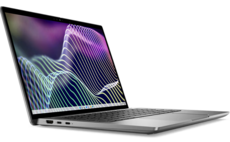
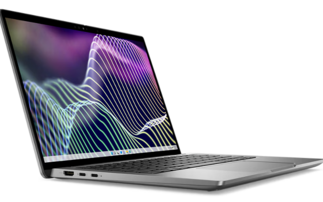
Eurocom Corporation's workstation-class Panther 2.0 notebook combines eye-watering performance with a form-factor that is portable, albeit to a limited degree. The price of the system is eye-watering as well, coming in at $9,632 + VAT as reviewed.
Launched in January, our Panther 2.0 system weighed in at a hefty 5.6kg, with dimensions of 42 x 28 x 6cm. Even the AC adaptor weighs more than any netbook (normally around a kilo), and most other small laptops, at 1.7kg.
Because it’s portable, the Panther 2.0 system is ideal for users needing specific applications on remote sites for temporary periods of time. However, the notebook's weight precludes it from being carried everywhere – unless, of course, you're an Olympic weightlifter.
The sheer number of connection options – eSATA, FireWire, gigabit Ethernet, micro-storage flash cards and USB 3.0 – will please most technophiles.
Specifications
Eurocom's website allows users a great selection of hardware options to make up a Panther system suited to their needs.
The model we tested had a fantastic specification, with top-of-the-range (or close to it) CPU, system memory and disk storage.
The processor is an Intel Xeon W3680 hex-core server processor clocked at 3.33GHz, supported by 24MB (formed from three 8GB SoDIMMs) of 1333MHz DDR3 triple-channel memory.
Panther's display is a 17.3-inch Widescreen Ultra eXtended Graphics Array (WUXGA) LED-backlit model, with a native resolution of 1920 x 1080 pixels, driven by an nVidia Quadro FX 3800M graphics system. The FX 3800M uses 1GB of DDR3 graphics memory and is certified for high-end computational tasks such as CAD and biological visualisation.
For storage the Panther has a RAID 0 array of three 400GB MLC (multi-level cell) Solidata solid state devices (SSDs), controlled by a Sandforce 1500 controller, giving a usable capacity of about one terabyte (1TB = 1,000GB).
The Panther was configured with the above extras, which do bump up the price; the nVidia graphics card added an extra £684, the processor an extra £781 and the memory £1,753. There is an online configurator that potential owners can use to configure exactly the system they want, if they are counting the pennies.
Ports and connections
The Panther 2.0 has most connections and port types covered, arrayed on the left- and right-hand side of the system.
On the left-hand side of the system is a DVI-D connection to drive external monitors, a CATV connector, HDMI in and out connectors, standard FireWire and eSATA ports, two USB connections supporting the latest USB 3.0 specification, and a Matshita BD-MLT UJ240AS optical drive (supports Blu-Ray Read/Write (RW), DVD R/W and CD R/W).
There is also a slot for small form factor storage cards supporting multimedia cards (MMC), secure digital (SD) and micro-SD formats.
On the right side of the system is a security lock, three USB 2.0 standard ports and three audio jacks for headphone, microphone and line-in, as well as a Sony/Philips Digital Interconnect Format (S/PDIF) connection for carrying digital audio data.
Usage
Our review sample ran under the 64-bit version of Windows 7 Ultimate, although Eurocom said users can install Linux operating systems, specifically Red Hat and Ubuntu distributions.
Typing on the keyboard is a good experience because the Panther is big so provides a firm base on which users can rest their forearms. The glossy screen did show reflections more than usual, but the display was rock solid, displaying crisp, sharp images.
Network connectivity
Network connectivity on the Panther can be through the JMicron PCI Express gigabit LAN adaptor, or wirelessly via an Intel Centrino Ultimate-N 6300 AGN card.
There was no Bluetooth connectivity on our review model, although it can be specified as an option.
Applications
Most users will be deploying this system for specific high-end graphic/scientific technical applications, so there aren't many applications installed by default, just packages to drive the BisonCam web camera, BisonCap v9.2.1, and the fingerprint scanner, which uses Upek's Protector Suite 2009.
The fingerprint scanner adds an extra layer of security to the Panther when the machine is used to store sensitive technical data.
Overall performance
Typical desktop and laptop performance benchmarks would not really do justice to the Panther 2.0 since its constituent components – the RAIDed SSDs, hex-core processor, graphics card and large amount of system memory – give it a performance that far outstrips standard laptops, and even some desktop workstations.
However, out of curiosity we benchmarked the system with PassMark's Performance Test software.
This brought up the highest figures we've seen on a laptop, with some of the benchmarks for CPU, memory and storage performance being 10-20 times better than our standard Core 2 Duo-based labs laptops.
We also used the industry-standard SPECviewperf graphics test suite (version 11) to get a proper assessment of the Panther's graphics performance [see picture].

The Standard Performance Evaluation Corporation (SPEC) is a non-profit organisation that maintains and endorses standardised sets of relevant benchmarks applicable to high-performance computers.
The applications used to form the benchmark include industry standard ones such as LightWave and Maya, for example. The SPECviewperf benchmark results we obtained could be compared with HP's EliteBook 8740w Mobile Workstation [see picture].

It did seem that the 24GB of system memory was not affecting the benchmarks scores significantly, especially since the benchmarks are primarily graphic in nature, so a smaller amount of memory that would reduce the price significantly could produce broadly similar SPECperfview scores.
SSD performance
To check SSD performance we used several disk benchmarking tools – ATTO, CrystalDiskMark and the disk benchmarking part of PassMark's Performance Test package.
We recorded sequential reads and writes using ATTO of 698MB/s and 660MB/s respectively [see picture].

As a rough comparison, Intel's X25-M 160GB SATA solid-state drive gives read speeds of about 250MB/s.
USB 3.0 performance
Perhaps the most interesting connectivity option on the Panther, besides the triple SSD-RAIDed system disk, is the provision of two USB 3.0 ports. This gives users much faster data transfer speeds when saving data to removable devices such as flash drives and external SSDs. Version 3.0 is the next iteration of the USB standard, which will theoretically give data transfer rates of 5Gbit/s (625MB/s).
Again we used ATTO, CrystalDiskMark and the disk benchmarking part of PassMark's PerformanceTest package to assess USB 3.0 performance.
We tested three USB devices on the system: a 64GB Kingston DataTraveler Ultimate USB 3.0 flash drive; a 64GB Kingston Hyper Max 3.0; and a Sandberg AluGear USB 3.0 Hard Disk Box 3.4" containing a Hitachi DeskStar 3TB 7.2K rpm hard disk.
We recorded sequential reads and writes using ATTO for all three devices and the results show that providing USB 3.0 connectivity is a definite boon for users.
We recorded sequential read and write speeds for the Sandberg USB 3.0 hard disk box of 151MB/s. For the Kingston 64GB Hyper Max and DataTraveler Ultimate USB 3.0 devices, the sequential read speeds were 196MB/s and 87MB/s, while sequential writes gave speeds of 174MB/s and 68MB/s [see picture].

Although users are not likely to see data transfer speeds attained using ATTO, we did record real-time transfer speeds of 76MB/s for transferring data to the fastest USB 3.0 device we looked at – the Kingston Hyper Max 3.0. Compare that with a USB 2.0 transfer rate recorded using a standard USB 2.0 flash drive of 2.9MB/s.
Battery life
The Panther 2.0 is a system you would not normally run off the battery for too long, but it does have a Li-ion polymer battery, rated at 4.44Ah (88.8Wh).
We checked the battery life while the system was idling and also when it was under intense load, running high-end graphics applications or transferring large amounts of data through the various eSATA, FireWire, network and USB connections.
Just idling gives a battery life of about 46 minutes. While under a heavier load (for example, performing the SPECviewperf benchmark) the Panther held out at 44 minutes. The relatively short battery life is not surprising, given the power requirements of the system.
The battery takes 80 minutes to recharge to 90 per cent capacity, and an extra 40 minutes to hit the 100 per cent mark [see picture].

Conclusions
We were very impressed with Eurocom's Panther 2.0 notebook, and it handled all the computational tasks we threw at it easily.
Technical applications requiring large datasets to be held in system memory will benefit from the 24GB of triple-channel system memory. However, datasets requiring fast read/writes to the system disks will benefit from the RAID 0 triple SSDs.