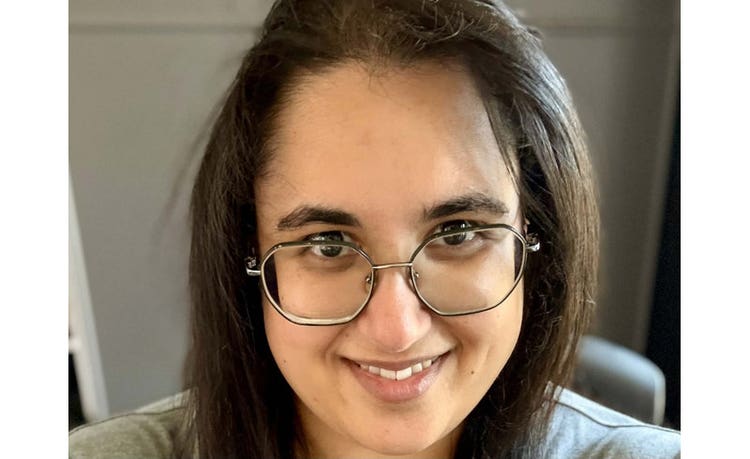
Lydia Nicola
Part of the IT Leaders 100 - a list of the most influential IT leaders in the UK in 2026.
Lydia Nicola leads IT Operations at Amnesty International, overseeing infrastructure, cloud, business applications and service redesign across a federated international organisation. Before Amnesty, she led shared IT services across a consortium of UK charities, balancing the independence of each member with their common ambitions. Her interests run to the social impact of digital infrastructure, inclusive governance, and the ethical adoption of emerging technology – including early policy work on AI and information governance. Outside the day job, she mentors early-career professionals from under-represented backgrounds.
What's the most exciting part of your current role?
The volatility. I lead IT operations for Amnesty International – which fights for human rights in some of the most complex environments in the world, and gets buffeted by geopolitics more than most organisations. I may have a plan and priorities for the week, but something can and will come out of nowhere and throw the whole thing off. These have included:
- How do we get a smartphone into a country where Amnesty is banned, when the person receiving it cannot be seen to take anything from us without putting themselves at serious risk?
- We've just been expelled from a country and have to shut the office down – how do we get the data out, and how do we safely destroy the technology that's left behind?
- How do we plan for the possibility of being sanctioned by Israel, India, China or even the US government?
- As well as much more!
It's a role that never lets me get bored. And because I know the underlying work – the research and advocacy that protect people who would otherwise have nobody – makes a real difference in the world, the volatility I might otherwise find draining is what keeps me going.
What do you do in week one of a new project to avoid pain in month six?
Conversations – and a fairly specific kind of conversation – both one-to-one and in a group. Before anything else, I want to sit down with each person involved with the project, one at a time, and find out what they actually want from it: what success looks like to them, what failure looks like, what they need, and where their absolute red lines sit.
The questions are simple, but they reliably surface things that would otherwise come back to bite us in month six. On a recent project, two teams turned out to mean genuinely different things by "go-live" — a six-week gap that nobody had spotted.
I do the one-to-ones first. People are more honest individually, particularly about what would make them regret signing up. Then the group session, where differences are aired and worked through openly rather than allowed to fester until they become a fight about deliverables.
By the end, everyone in the room has heard what everyone else needs, what they fear, and where their lines are – and they have said so themselves. Alignment, earned through conversation, prevents the pain in month six – far more reliably than alignment imposed by a document.
What’s the part of your estate you most want to simplify in 2026?
Our processes – and through them, our systems.
We're looking at a potentially major project to move off our hitherto American technology stack, motivated by geopolitical risk, and it has thrown the sprawl of our application estate into sharp relief. Any international organisation of our size ends up with a long list of tools – genuinely, you do need a lot of different things – but the list is longer than it needs to be, and the European alternatives we are considering are often smaller and less feature-rich than their Microsoft equivalents.
You cannot drop a process designed around what Microsoft can do onto a tool that cannot do half of it. So we need to consider process simplification. For each process, we need to ask honestly: what does this actually need to accomplish, what are our red lines, how critical is it. Only then, and arising from that, do we define what the system underneath it really needs to do.
Get the processes right and the system simplification follows; try it the other way round and you end up forcing tools to imitate things they were never built for.
Excluding smartphones, what piece of technology could you not live without and why?
My Kobo – a boring answer, but an honest and well-founded one!
I read, on average, a book and a quarter a day. Between travel and chronic illness that has put me in hospital many times, there are stretches where I can't carry, or be brought, the volume I need. The comfort of knowing I have 6,000 books with me, ready to suit whatever mood I'm in, is hard to overstate.
It can't be a Kindle, though. I'm passionate about data portability and the importance of not locking down file formats, so I work entirely in EPUBs, manage everything in Calibre (a lovely piece of open-source e-library software), and don't buy e-books from Amazon.
In an age of subscription services where you increasingly don't own anything – and where companies can quietly remove e-books from accounts you thought you'd bought from – there's a real freedom in knowing that wherever I go, those books are mine. They're backed up in several places. No one can take them away.
Do I still love physical books? Yes. But I can't carry my whole paper library! When the chips are down, my Kobo is with me and always delivers for me.
What excites you most about the future of IT?
When what's coming will deliver for people, and how people will deliver it. What's always excited me about IT is the possibilities – and that hasn't changed. AI and quantum are the headline answers, and I'm not immune to the noise around them, including the genuine concerns, but technology by itself doesn't do very much. It's what happens when humans meet it that matters. The old adage holds – people, process, technology – and in that order.
Each evolution since Babbage has made computing and its ancillary tools a bit more accessible. We're now at a point where you no longer need to be a coder to take an idea and build something with it, which admittedly has horrible ramifications in some directions but genuinely interesting ones in others, and we also still have substantial tech inequities to address before "accessible" means what it should. But the trajectory is real.
What excites me practically is what this means for the people I support: more flexibility, fewer boring tasks, and headroom for things their roles couldn't previously include. The technology in future IT is certainly interesting to me – but the results will be more exciting!
What talent are you quietly proud of that would never show up on LinkedIn?
An oddly specific memory for substance and details.
I read very fast – a familial trait, probably genetic, rather than something I actually earned – but the talent underneath that, if you can call it a talent, is what I do with what I read. I'm hopeless with names and titles, I won't remember what a document is called or where it's stored, and I'll forget the title of a book ten minutes after finishing it. What I remember is the substance: what mattered, what was at stake, what the argument was.
The same thing happens with people. I may forget your name (and possibly mine), but I'll remember that your eldest is starting school this term, or that you're managing something difficult at home, or a particular project you mentioned months ago that you were nervous about. That's how I access the world – through caring about people and what's actually going on with them, rather than through the labels we attach to them.
It's also why I get cheerfully obsessive about niche subjects: charity VAT, the history of the welfare state, nineteenth and twentieth-century girls' literature as a window onto social history. Same instinct, different object.
What’s your most-used keyboard shortcut or command that you wish everyone knew?
Windows + V – multi-clipboard. I've taught this shortcut more than any other (since Windows built it in and I could finally share it without having to install my beloved ArsClip extension), and the reaction is consistently the same: people had no idea their computer could do this, and they can't quite believe how much time it now saves them.
Windows + V opens your clipboard history – everything you've copied, stacked and waiting, ready to paste at will. Something I copied at ten in the morning is still there at five in the afternoon when the topic comes back round and I need it again. Apple doesn't have one built in, irritatingly, but there are applications that fill the gap.
If you flip between documents, juggle screenshots, and pull numbers from a calculator into a spreadsheet – which is most knowledge work – it changes how you operate. You stop losing things because the next copy didn't overwrite them.
Honourable mention to Ctrl + Shift + L, which makes an unordered list. I do like a bullet point, as anyone who has ever received an email from me will testify.